Posts

Useful ABAP Programs & Function Modules in SAP BI

Program Name Usage RSCDS_NULLELIM Delete fact table rows where all Key Figure values are zero. See Note 619826. RSDG_CUBE_ACTIVATE Activation of InfoCubes RSDG_CUBE_COPY Make InfoCube Copies RSDG_CUBE_DELETE Delete InfoCubes RSDG_DODS_REPAIR Activation of all ODS Objects with Navigation Attributes RSDG_ODSO_ACTIVATE Activation of all ODS Objects RSDG_IOBJ_ACTIVATE Activation of all InfoObjects RSDG_IOBJ_DELETE Deletion of InfoObjects RSDG_IOBJ_REORG Repair InfoObjects RSDG_IOBJ_REORG_TEXTS Reorganization of Texts for InfoObjects RSDG_MPRO_ACTIVATE Activating Multiproviders RSDG_MPRO_COPY Make Multiprovider Copies RSDG_MPRO_DELETE Deleting Multiproviders

SAP Business Objects Architectures

Image
How Business Objects Fits with SAP Nice visualization of how the front-end tools can be connected to the datasources: End User Perspective: Integrated Architecture:

Xcelsius 2008 Connectivity with SAP NW BI/BW 7 (Connecting SAP BI Directly with Xcelsius 2008)

Image
BusinessObjects Xcelsius 2008 Enterprise : BusinessObjects Xcelsius Enterprise has all of the features of Xcelsius Engage. In addition, it offers integration capabilities with web portals and Reporting Services. BusinessObjects Xcelsius Enterprise integrates with the BusinessObjects platform, including Query as a Web Service (QaaWS or QaWS), LiveOffice and Crystal Reports. It is intended for users who wish to create visualizations that are deployed in a BusinessObjects Enterprise Environment. License Model : BusinessObjects Xcelsius Enterprise is delivered in two-part licensing structure. i)BusinessObjects Xcelsius Enterprise: Licensed per name user. ii) BusinessObjects Xcelsius Enterprise Interactive Viewing: Licensed per name user or CPU. Languages: English, French, German, Italian, Spanish, Portuguese (Brazilian), Dutch, Swedish, Simplified Chinese, Traditional Chinese, Japanese, Korean and Russian. The following figure illustrates the different ways of connectin...

Performance Tuning in SAP BW/BI

If the client have BW Accelerator implemented. By Creating BWA indices we can improve Query Performance. else (No BWA Exist) Check whether BI Stattstics Cubes has been enabled or not Go to T.code RSDDSTAT -->Query Name --> All, On ( X ) --> Save it. So now we have enabled statistics on that query. For Query RunTime : Stats InfoCubes 0TCTC01 - Low level details can be seen in this Stats cube. 0TCTC02 - 0TCTC03 :(Very Detailed Stats Info) Aggregates fast providing, Aggregates being in use,  DB Ratio = Read / Transferred, the ratio only recommended is 10% . For Loading Related: 0TCTC21 - Process statistics 0TCTC22 - InfoPackage 0TCTC23 - DTP To Check Runtime of BW/BI Queries : Goto T.code RSRT Provide Query Name - ->Execute & Debug. Query Step ID. A pop-up window will appear.....Check a few : Use without Cache, Display Statistics Info. You can check further more info in the following tables : RSDDSTAT RSDDSTATAGGR...

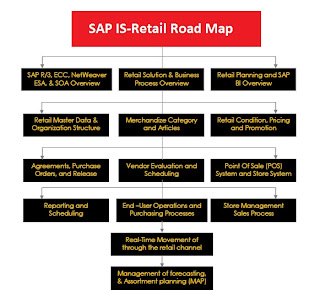
SAP BI - BOBJ Acronyms - SAP IS-Retail Road Map

Image
BW Query Element OLAP Universe Element Cube dimension Class Characteristic (incl. Time and Unit) A class with dimension and detail objects (detail objects for key and description) Hierarchy A class containing a dimension and detail objects for each hierarchy level. Calculated key figure (CKF) Measure element in a class named key figures (information about the calculation is not available via the universe but the CKF is available to be used) Restricted key figure (RKF) Measure element in a class named key figures (information about the restriction is not available via the universe but the RKF is available to be used) Key Figure Measure element in a class named key figures Navigational attribute A class with dimension and detail objects(detail objects for key and description) Display attribute Each display attribute becomes a detail object underneath the related dimension object. Query filter Filters will be applied to the underlying query but are not visible in OLAP universe....

Formulas In Excel for Various BO Dashboard / Webi / Crystal Reports Formulas.

MS Excel Formulas for formatting of data as input to Xcelsius 2008. 1.Maximum =MAX(A2:A9) 2.Minimum =MIN(A2:A9) 3.Rank =RANK(C2,$C$2:$C$12) 4.Match =MATCH(F3,$A$2:$A$16,0) 5.Index =INDEX($B$2:$B$16, F12) 6.=IF($B$2=1,C5,IF($B$2=2,C6,IF($B$2=3,C7,IF($B$2=4,C8,"")))) : If you have 4 Records according to index. Excel Format Cells: Number Currency... 1.Custom - >Type Eg: #,##0.00 #,##0.00;[Red]#,##0.00 To show different Colors for Positive & Negative values [Blue]#,##0.00;[Red]#,##0.00 all the numbers until first first semicolon will be positive and Blue in color rest of the numbers will be in Red i.e., Eg: I 1543 -543 Eg: II 500 Blue #,##0.00; 500#,##0.00 --------------------------------------------------------------------- Crystal Reports Formulas: INT((CurrentDate - tblemployees.DOB)/365.25) [tblemployees.Surname]&" "&[tblemployees.First Name]

Business Intelligence Types

Web Intelligence on top of SAP NetWeaver BI: Web Intelligence connectivity: BI metadata feature SAP OLAP BAPI support level Characteristics (incl. Time and Unit) InfoCube/BI Query Hierarchies InfoCube/BI Query Basic Key Figures InfoCube/BI Query Navigational Attributes BI Query only Display Attributes InfoCube/BI Query Calculated Key Figures / Formulas BI Query only Restricted Key Figures BI Query only Custom Structures BI Query only Variables BI Query only Web Intelligence / OLAP Universes: Connectivity towards BI queries Queries need to be configured to “Allow external access” Consider Crystal Reports for a direct ODS / DSA access (Direct BAPI access) Connectivity towards InfoProvider level Consider the different sets of meta-data exposure Consider BI Authorizations / Authorization variables SAP BI element Universe object Universe object Dimension Class Characteristic Subclass with dimension and detail objects Characteristic with hierarc...

Acronyms & Terminology

CORBA: C ommon O bject R equest B roker A rchitecture. The Common Object Request Broker Architecture (CORBA) is a standard defined by the Object Management Group (OMG) that enables software components written in multiple computer languages and running on multiple computers to work together. CORBA uses an interface definition language (IDL) to specify the interfaces that objects will present to the outside world. CORBA then specifies a mapping from IDL to a specific implementation language like C++ or Java. Standard mappings exist for Ada, C, C++, Lisp, Ruby, Smalltalk, Java, COBOL, PL/I and Python. There are also non-standard mappings for Perl, Visual Basic, Erlang, and Tcl implemented by object request brokers (ORBs) written for those languages. General InterORB Protocol (GIOP) Main article: General Inter-ORB Protocol The GIOP is an abstract protocol by which Object request brokers (ORBs) communicate. Standards associated with the protocol are maintained by the Object Ma...
Report: RSDG_ODSO_ACTIVATE To Activate or Check Consistencies without Transport .

An Issue after The UpGradation of SAP GUI or MS Office 2003/2007

Issue 1# I get an "I18N Initialization" dialog that says "Could not open libsapu16vc71.dll" which appears everytime, this states that the application is terminating. This happens when I try to expand the "SAP Systems" node in MMC, which was previously worked fine. For this Just Search for the file libsapu16vc71.dll in SAP installed drives . Copy this file and Paste in location Drive:\Program Files\SAP\Common Files: librfc32.dll or Drive:\WINDOWS\System 32\libsapu16vc71.dll. Once this Shared file can locate, The SAP MMC Allowed to Start the Server. This way i fixed it..! Issue 2# BI BEx Analyzer Not working after upgrade or Reinstall ( SAP Gui - Office 2003/2007) If the above error resolve, some times BI BEx Anal yzer or Query Designer will not work. For that, you can get an BExAnalyzer.exe file, Delete the file where i got installed on server and replace with BExAnalyzer.exe file from installati...